Simple Training Guide
|
SOP Title |
Creating a HubSpot Campaign |
|
Owner |
Marketing Operations |
|
Effective Date |
07/29/2026 |
|
Last Updated |
07/29/2026 |
|
Purpose |
Shows users how to create and name a HubSpot Campaign. |
Loom Video: Campaign Creation SOP Training Video.mp4
How to use this guide: Complete each step in order and add the matching screenshot in the space provided.
Step 1: Search for Existing Campaigns
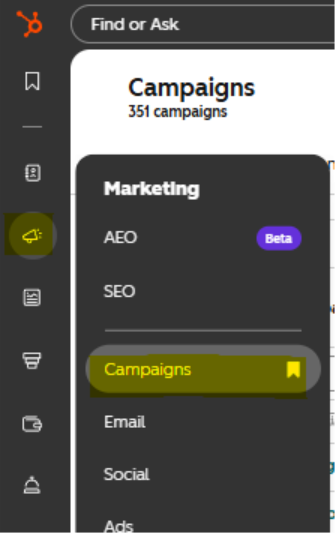
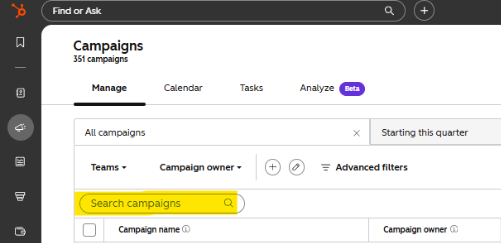
Description: In HubSpot, go to Marketing > Campaigns. Use the search bar to confirm that the campaign doesn't already exist. Search for multiple iterations of the campaign name (acronyms, full name, etc.) to confirm.
Screenshot / Picture for Step 1
Step 2: Begin the Campaign Creation Process
Description: If no existing campaign is found click “Create Campaign”, followed by “Start from scratch”, then click “Next”
Screenshot / Picture for Step 2

Step 3: Determine Campaign Prefix and Name
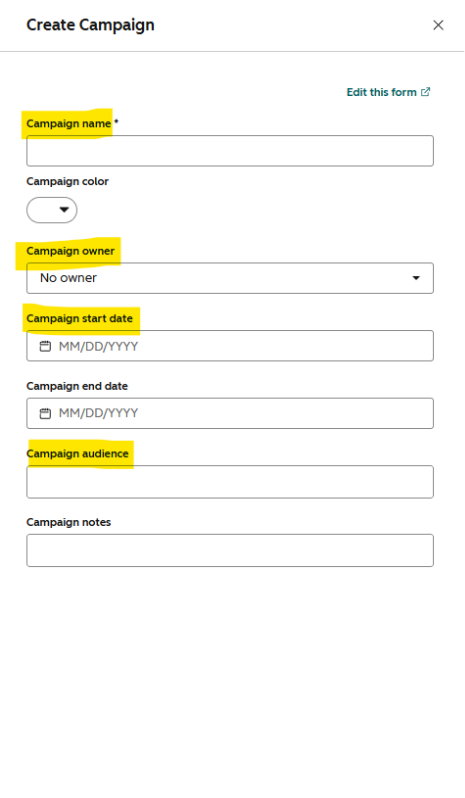
Description: Determine the correct prefix and specific campaign name for the effort from the choices listed in the table below, then enter the full name into the “Campaign name” field using the format “prefix_specificcampaignname”. IMPORTANT: campaign names should only contain lower case letters, with no spaces or symbols (other than the required underscores)
|
Campaign type |
Prefix |
Specific campaign name |
|
Marketing campaign-based content |
camp_ |
Name of specific marketing campaign. Example: camp_affordableassurance |
|
CHM program specific content with a specified audience. |
prgm_ |
This category requires a third section, so the layout will be "prgm_audience_programname". Example: prgm_members_maternity |
|
Sponsorship content |
spsr_ |
Name of sponsor Example: spsr_lifewise |
|
Influencer content |
infl_ |
Influencer handle. Example: infl_daughterofdelight |
|
Paid Media content |
pame_ |
Media outlet (Example: pame_pandora) |
|
Event based content |
evnt_ |
Event name (Example: evnt_lifesurge) |
|
Content marketing |
coma_ |
This category requires a third section, so the layout will be “coma_audience_effort” Example: coma_general_blog |
Step 4: Create the campaign
Description: Fill out any remaining necessary fields such as Owner and Start Date if applicable, then click the “Create” button.
Screenshot / Picture for Step 4